Command Query Responsibility Segregation (CQRS)
Command Query Responsibility Segregation splits the model you write through from the model you read through. This post is for .NET engineers weighing whether that split is worth it. CQRS earns its keep in complex domains with lopsided read/write volumes, and it actively hurts in plain CRUD apps — most of this post is about telling those two situations apart. I cover the problem it solves, how the pieces fit together, the eventual-consistency tax you take on, and the anti-patterns that quietly turn CQRS back into CRUD with extra steps.
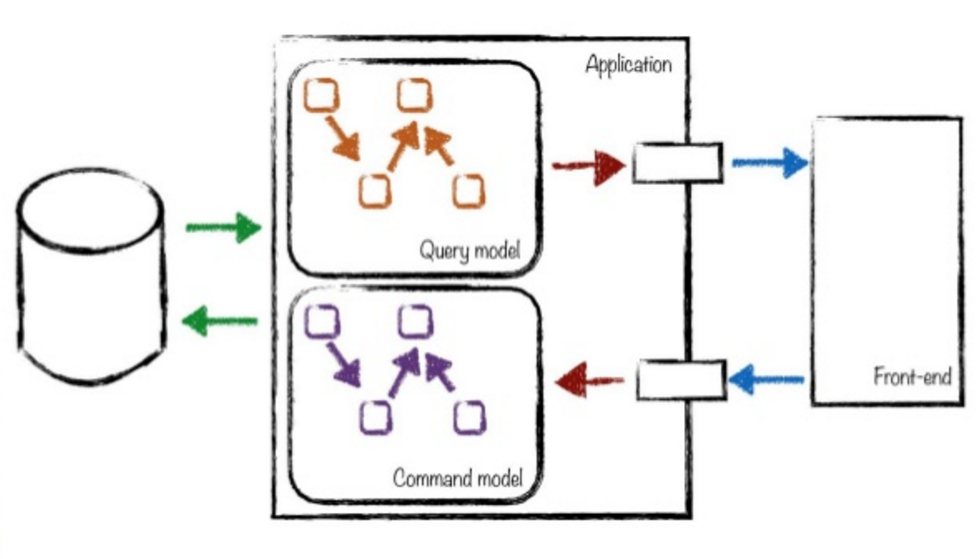
The core idea
CQRS separates writing (commands) from reading (queries) into distinct models, allowing each to scale and evolve independently.
- Commands mutate state (create, update, delete)
- Queries read state without side effects
- Communication is asynchronous via message queues, not direct method calls
- Eventual consistency means reads lag slightly behind writes
The pattern was originally described by Greg Young in 2011, but promoted by Martin Fowler in his pattern and practices books. It’s used in combination with Domain Driven Design and Event programming.
The problem it solves
In traditional CRUD systems, one data model handles both writes and reads:
1
2
3
4
5
6
7
8
9
10
11
12
13
// Traditional: One model for read and write
public class Order
{
    public int Id { get; set; }
    public List<OrderLine> Lines { get; set; }  // Complex; used in writes
    public OrderStatus Status { get; set; }
    public DateTime CreatedAt { get; set; }
    public Customer Customer { get; set; }  // Heavy join; only needed for reads
    public List<PaymentHistory> Payments { get; set; }  // Audit trail; slows writes
}

// Write operation: Only needs Id, Lines, Status
// Read operation: Needs all fields plus joins
This creates tension:
- Writes want a normalized schema with referential integrity (slow)
- Reads want a denormalized schema with all data in one place (fast)
CQRS resolves the tension by giving each side its own optimized model. You stop forcing one schema to be good at two opposing jobs.
Architecture
1
2
3
4
5
6
7
8
9
10
11
12
13
14
15
16
17
18
19
20
21
┌─────────────┐
│   Client    │
└──────┬──────┘
       │
       ├─────────────────────┬──────────────────────┐
       │                     │                      │
   [WRITE]              [READ]                  [QUERY]
       │                     │                      │
       ▼                     ▼                      ▼
┌──────────────┐    ┌────────────────┐    ┌──────────────┐
│ Command      │    │ Event Bus      │    │ Query Model  │
│ Handler      │    │ (RabbitMQ/     │    │ (Optimized   │
│              │    │  Kafka)        │    │  for reads)  │
└──────┬───────┘    └────────┬───────┘    └──────────────┘
       │                     │                     ▲
       ▼                     ▼                     │
┌──────────────┐    ┌────────────────┐             │
│ Write Model  │    │ Event Handler  │─────────────┘
│ (Normalized) │    │ (Updates read  │
│              │    │  model)        │
└──────────────┘    └────────────────┘
Implementation Strategy
Step 1: Identify Command and Query Models
Command Model - Optimized for writes:
- Normalized schema (3NF, BCNF)
- Enforces business rules and constraints
- Uses transactions to maintain consistency
- Example: Insert Order → OrderLines → OrderPayments with foreign keys
Query Model - Optimized for reads:
- Denormalized schema (often a flat table or document)
- Includes all fields needed by UI in one record
- No joins; reads are fast
- Example: OrderSummary table with customer name, total, status, etc.
Step 2: Publish Domain Events
When a command completes, publish a domain event so other parts of the system react.
1
2
3
4
5
6
7
8
9
10
11
12
13
14
15
16
17
18
19
20
// Command handler
public class CreateOrderCommandHandler
{
    public async Task Handle(CreateOrderCommand cmd)
    {
        // Write to command model
        var order = new Order { Id = cmd.OrderId, Status = "Created" };
        await _db.Orders.AddAsync(order);
        await _db.SaveChangesAsync();

        // Publish event
        await _eventBus.PublishAsync(new OrderCreatedEvent
        {
            OrderId = cmd.OrderId,
            CustomerId = cmd.CustomerId,
            Amount = cmd.Amount,
            CreatedAt = DateTime.UtcNow
        });
    }
}
Step 3: Update Query Model Asynchronously
Event handlers subscribe to domain events and update the read model.
1
2
3
4
5
6
7
8
9
10
11
12
13
14
15
16
17
18
19
// Event handler in a different service
public class OrderCreatedEventHandler : IEventHandler<OrderCreatedEvent>
{
    public async Task Handle(OrderCreatedEvent @event)
    {
        // Update query model (denormalized)
        var summary = new OrderQueryModel
        {
            OrderId = @event.OrderId,
            CustomerName = await _customerService.GetNameAsync(@event.CustomerId),
            Amount = @event.Amount,
            Status = "Created",
            CreatedAt = @event.CreatedAt
        };

        await _queryDb.OrderSummaries.AddAsync(summary);
        await _queryDb.SaveChangesAsync();
    }
}
Step 4: Query the Read Model
Reads are fast because all data is already denormalized.
1
2
3
4
5
6
// Query - super fast, no joins
public async Task<OrderQueryModel> GetOrderAsync(int orderId)
{
    return await _queryDb.OrderSummaries
        .FirstOrDefaultAsync(o => o.OrderId == orderId);
}
Pro-active vs reactive reads
- Pro-Active: Client polls for data state (inefficient, creates load)
- Reactive: Client subscribes to state changes via events (desirable)
1
2
3
4
5
6
7
8
9
10
11
12
13
14
15
16
17
18
19
20
21
22
23
24
25
26
27
28
// Pro-Active: Client asks "Is my order ready?"
public class OrderController
{
    [HttpGet("{id}")]
    public async Task<OrderStatus> GetStatus(int id)
    {
        return await _queryDb.OrderSummaries
            .Where(o => o.OrderId == id)
            .Select(o => o.Status)
            .FirstOrDefaultAsync();
    }
}

// Reactive: Client receives push notification
public class OrderStatusChangedEvent
{
    public int OrderId { get; set; }
    public OrderStatus NewStatus { get; set; }
}

// Client listens via SignalR or WebSocket
public class OrderHub : Hub
{
    public async Task SubscribeToOrderStatus(int orderId)
    {
        await Groups.AddToGroupAsync(Context.ConnectionId, $"order-{orderId}");
    }
}
Trade-offs
What CQRS does not give you for free
- Resiliency - That’s a separate concern (retries, timeouts, circuit breakers)
- Elastic scaling - That’s an implementation detail (Kubernetes, auto-scaling groups)
Living with eventual consistency
Eventual consistency means reads lag behind writes by seconds or minutes. This is the bill that comes due with CQRS, and you pay it in the UI.
Problem: User creates an order, immediately queries for it, gets “not found.”
Solution: Client-side UI hides the delay:
- Optimistic UI updates (show the order immediately while writing)
- Polling with backoff (retry if not found)
- Acknowledgment pattern (server responds with order ID, client queries later)
When to use it
Good fit:
- Complex domain with many business rules (financial systems, insurance)
- Read and write volumes are vastly different (100K reads, 100 writes/second)
- Multiple services need to react to state changes
- You need audit trails and event sourcing
Not a good fit:
- Simple CRUD applications
- Strong consistency requirements (you need immediate reads after writes)
- Single-service applications (adds complexity without benefit)
Frameworks worth knowing
- NServiceBus - Enterprise service bus with CQRS support
- MassTransit - .NET service bus for microservices
- Akka.NET - Actor model framework for distributed CQRS
- Foundatio - Building blocks for distributed applications
- Event Store - Specialized database for event sourcing + CQRS
Anti-patterns to avoid
Every anti-pattern below has the same effect: it pays the cost of CQRS without collecting the benefit.
Anti-Pattern 1: Synchronous Commands and Queries
1
2
// DON'T: This defeats the purpose of CQRS
_queryModel.Update(cmd.Data);  // Synchronous write to read model
Anti-Pattern 2: Sharing Command and Query Models
1
2
// DON'T: CQRS requires separate models
public class Order { /* 50 fields */ }  // Used for both reads and writes
Anti-Pattern 3: Ignoring Eventual Consistency
1
2
3
// DON'T: Assume immediate consistency
await _commandBus.SendAsync(cmd);
var result = await _queryModel.GetAsync(...);  // May not exist yet!
The takeaway
CQRS is a sharp tool for a narrow problem: a complex domain where reads and writes pull the schema in opposite directions and far apart in volume. When that is your situation, separate models and async projection are worth the eventual-consistency tax. When it isn’t, reach for CRUD and keep your weekends. The fastest way to regret CQRS is to adopt it for a simple app because it looked sophisticated on a diagram.
References
- Eventual Consistency Trade-Offs in Distributed Systems
- Consistent, Available, Tolerant - CAP Theorem
- CQRS Journey
- CQRS Evolved with AKKA.net
- Event Storming - ‘What happened’
- DevOps - Service Reliability Engineering
- Akka.NET - Actor Model framework
- Foundatio - Building Blocks for distributed applications
- NServiceBus